
On April 2nd, the EPA launched the production application of ECMPS 2.0, ushering in a revised submission system for electronic data reporting. The weeks that followed have been a learning process for all new users, including us at VIM. As a team, we came together to debrief the rollout and divulge the tips, tricks, & must-knows for using this new tool. In this post, we’ll recap this first month navigating a new system while educating as many people as possible about the intricacies of this transition.
Preparing for the ECMPS 2.0 Transition
As soon as the EPA notification came through, our COMPAS and Development teams collaborated to ensure that our CEMLink® 6 systems were able to produce Electronic Data Reports (EDRs) compatible with ECMPS 2.0. That effort was achieved through EDR schema updates across our customer sites – an essential success during what was otherwise a chaotic first week. With these updates in place, our COMPAS team was able to move swiftly to both work directly with customers to transition their data and confirm file compatibility in the new system.
Once we were confident new data could be imported successfully, our focus shifted to helping customers backfill historical data into ECMPS 2.0. Thanks to months of preparation, we were able to navigate the CDX -> CBS -> ECMPS 2.0 permissions flow to ensure both VIM and our customers could connect to the system and initiate data transfers.
This was, in no small part, thanks to the tireless efforts of Rudi Muenster and Dru Sanders’, whose multiple live training classes provided breakdowns on the agent status/role system, data flow processes, live demonstrations, and walkthrough sessions with our clients and the COMPAS team.
These training courses proved to be a critical bridge between the work we conducted in the ECMPS 2.0 beta environment, numerous conversations with the EPA, and the uncertainties many users felt while waiting for the production system to go live. Through these training courses, and subsequent conversations, we were able to help customers identify their Direct Representatives (DR) and Alternative Direct Representatives (ADR).
This effort became essential once ECMPS 2.0 launched, as we were able to quickly coordinate with those DRs & ADRs to complete the initial sign-in process. Consequently, this provided all associated agents with access to their facilities. From here, the next tasks were understanding the new interface and preparation for quarterly submissions.
What’s Changed in the ECMPS 2.0 Interface
Once we gained access to the new system, we moved to make ourselves familiar with all the different options, interfaces, and processes. In the new system, all required documents have their own tabs where you can review data reports, import new data, & edit or add information, as needed. However, certain changes have been made to the workflow, as compared to ECMPS 1.0 – most notably the introduction of a check-out, check-in system that limits agent access to one unit at a time.
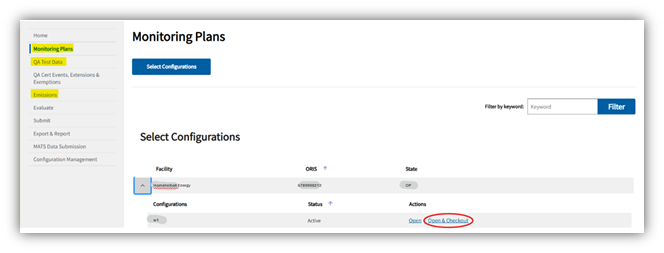
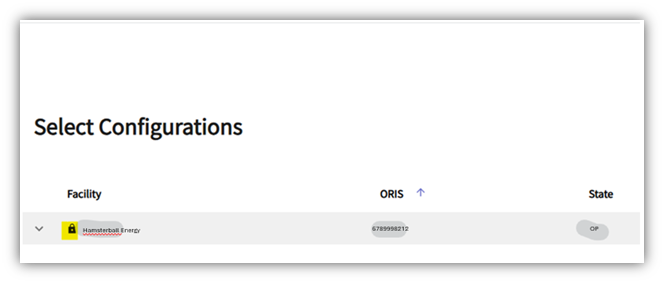
This new system allows agents to hop between a single unit’s QA, Emissions, & Monitoring Plan, permitting a user to take all necessary actions without having to track the unit down each time. That said, it’s important to understand users can only check-out one unit at one facility at a time. Once a unit is checked out, no other user may edit or evaluate it until it is checked back in. Unit status is easy to monitor, as checked‑out units display a lock icon next to the facility name.
Another important change, there is no longer an offline version of the submission system. Thus, all edits and imports are made on the record and are visible in the public view. There is a ‘Revert to Official Record’ button in case a user imports or edits documents in error. However, this will reset all progress back to the most recently submitted versions of the facility’s documentation. That said, there are built-in safeguards meant to prevent edits in error.
ECMPS 2.0 Submissions, Evaluations, and Data Safeguards
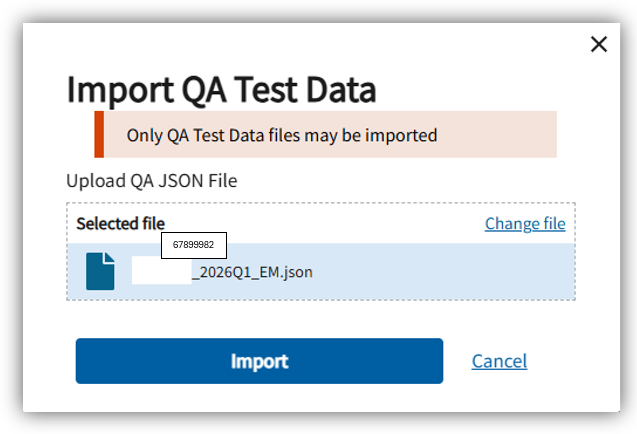
When it comes to importing EDRs for quarterly submissions, ECMPS 2.0 has been configured to only accept the .JSON file type. Additionally, the system has been created to distinguish between QA & EM EDRs and uses key identifiers to ensure files are imported to the correct unit. This means, if a user tries to upload an EM EDR into the QA interface – or upload an EDR for a different unit than the one checked out – the system immediately generates an error and halts the upload. This design ensures evaluation messages are only associated with the unit being reviewed.
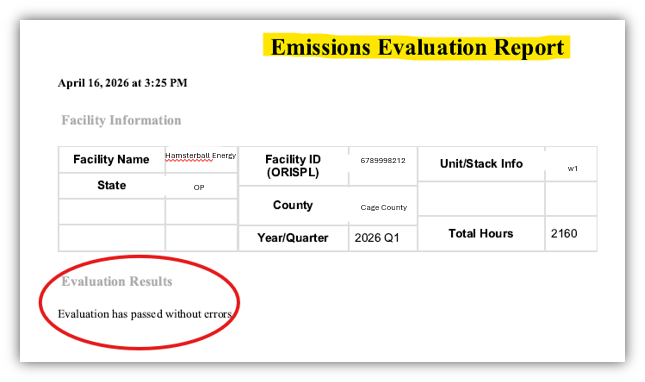
The evaluation & submission systems remain separate interfaces with interconnected functionality, as an evaluation is required prior to any submission. As part of the checks and balances built into this new system, evaluation and submission result statuses are emailed directly to the user who initiated the process – with submission statuses emailed to all agents associated with a facility. This encourages persistent communication and creates a flowing record, so all who need to know get to know. This function is especially important for coordinating actions and providing essential context for support cases.
ECMPS 2.0 Resources, Support, and Next Steps
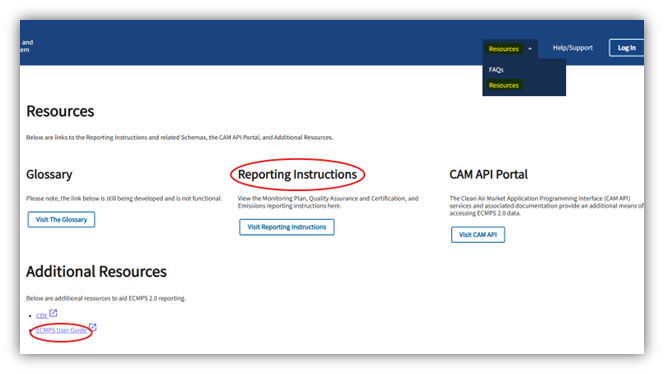
To support the transition, the EPA has made several helpful tools available within ECMPS 2.0, including the Reporting Instructions and the ECMPS User Guide. Users may also reach out to the ECMPS and CBS help desks for assistance with connectivity or interface issues. That said, given how new the system is, these help desks have quickly become inundated with requests. For this reason, we encourage our customers to contact VIM first when issues arise.
In particular, customers are advised to reach out to our COMPAS team, compas@vimtechnologies.com, as they are best prepared to review and advise on ECMPS 2.0‑related questions. For technical assistance to ensure system compatibility, our Support team can be reached at Support@vimtechnologies.com. If you are interested in working with the most prepared and knowledgeable group in data acquisition and reporting, you can contact our sales team for more information – sales@vimtechnologies.com.
All in all, this first month has been a whirlwind of information gathering, interface exploration, and extensive communication to ensure all of us at VIM and our clients could adapt successfully. In the end, the experience we’ve gained will lead to greater understanding and resilience as ECMPS 2.0 is altered and improved in the years to come.
With the first reporting month in the rear view, we hope this post provides valuable insights, practical guidance, and an opportunity to take a deep breath and reflect. We sincerely appreciate our customers’ patience and engagement throughout this transition and will continue to share updates as we learn more.


